CyberDefenders - Phantom Installer Lab
Writeup · Phantom Installer Lab
CyberDefenders - Phantom Installer Lab
ESCENARIO
On 6 July 2026, user Tarek was setting up a new workstation and downloaded several common software installers. He recalls that none of the installations caused any visible issues, but later that day all of his files were wiped. We suspect the user fell victim to SEO poisoning that led to downloading and running a trojanized installer, ultimately resulting in a destructive wiper payload.
HERRAMIENTAS
- BrowsingHistoryView, EZ Tools, dnSpy
Initial Access
- The user must have downloaded this rogue installer from a non-official domain. What domain did the victim download the suspicious installer archive from?
- Lo podemos ver en DB Browser Lite>tabla Downloads.
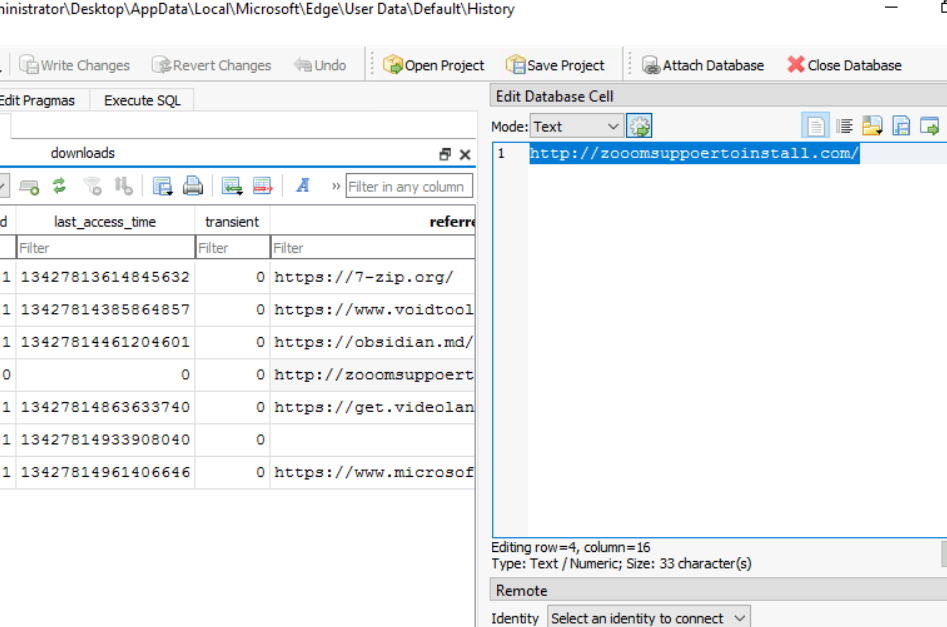
- Lo podemos ver en DB Browser Lite>tabla Downloads.
- After the suspicious archive was downloaded and extracted, the victim executed the installer from the extracted folder. What is the name of this rogue installer and its SHA1?
- Cogemos el Amcache.hve, ordenamos por File Key Last Write Timestamp y filtramos por c:\users\tarek.soliman\downloads en Full Path. Debemos de coger el primero que nos aparezca y como sabemos que el ejecutable tenía que ver con Zoom, sabemos que es ese.
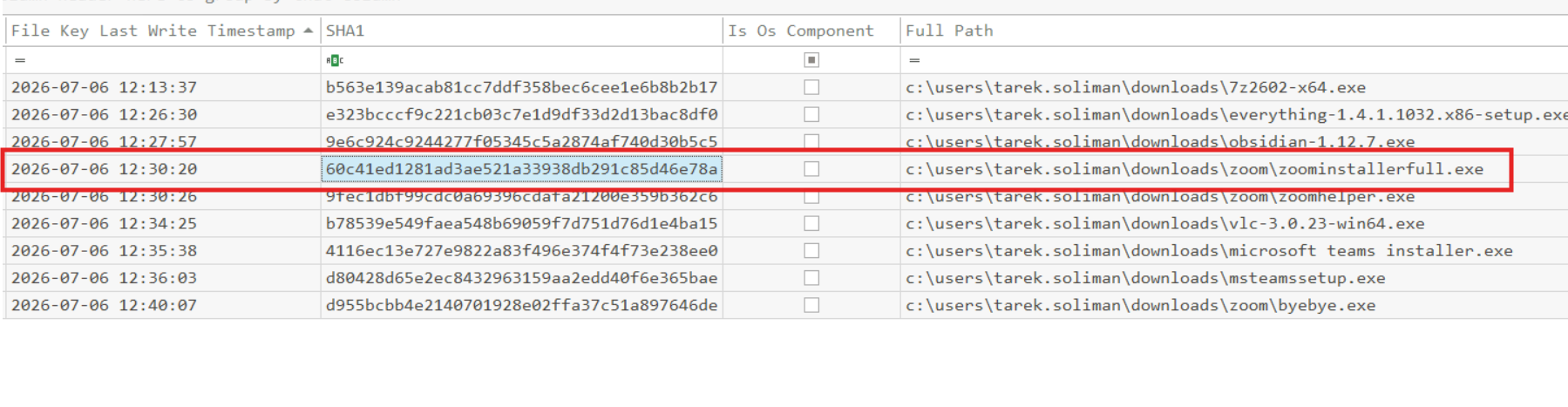
- Cogemos el Amcache.hve, ordenamos por File Key Last Write Timestamp y filtramos por c:\users\tarek.soliman\downloads en Full Path. Debemos de coger el primero que nos aparezca y como sabemos que el ejecutable tenía que ver con Zoom, sabemos que es ese.
Execution and AppDomain Hijacking
- We need to get more info about that installer. Check VirusTotal. What is the original filename of the installer that initiated the attack, and who is the first signer that VirusTotal shows?
- En la pestaña Details podemos ver las respuestas.
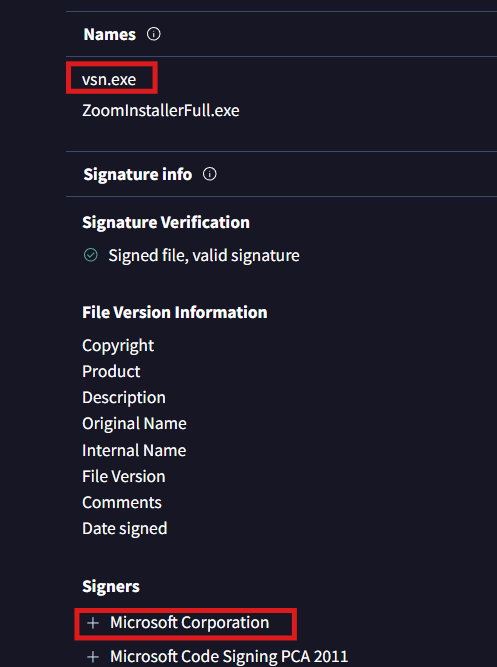
- En la pestaña Details podemos ver las respuestas.
- The installer itself is a legitimate signed executable, so there must be a file that alters its behavior. Examining the files extracted alongside the installer, what file alters its runtime behavior?
- Dentro de Prefetch, nos vamos al ejecutable ZoomInstaller.exe y dentro de Files Loaded vemos si nos choca algo.
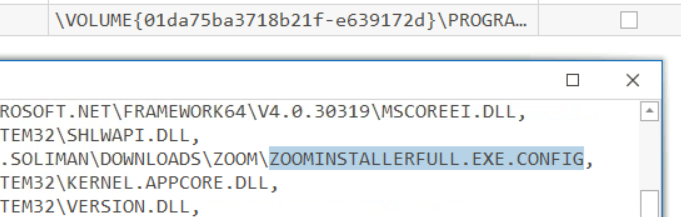
- Dentro de Prefetch, nos vamos al ejecutable ZoomInstaller.exe y dentro de Files Loaded vemos si nos choca algo.
- Inspect that file. What assembly name is specified in the configuration file that is loaded on startup?
- Como tenemos los archivos presentes (me acabo de dar cuenta de que el atacante no los ha borrado) abrimos el archivo correspondiente con Notepad.
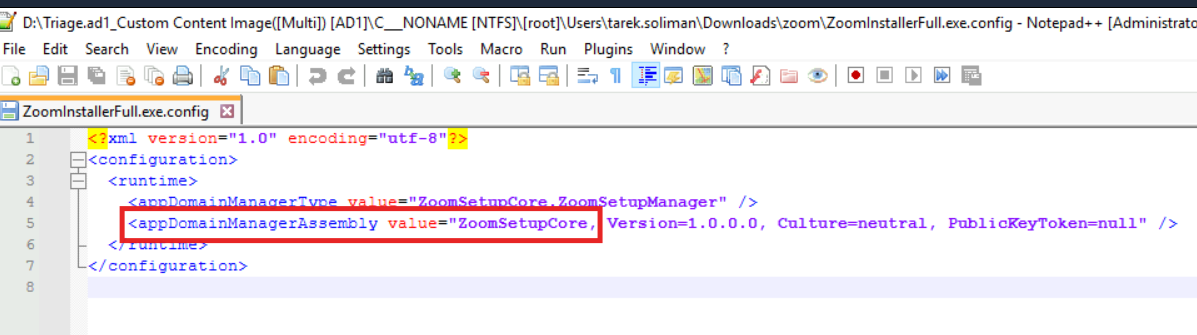
- Como tenemos los archivos presentes (me acabo de dar cuenta de que el atacante no los ha borrado) abrimos el archivo correspondiente con Notepad.
- What MITRE ATT&CK technique ID corresponds to this hijacking behavior?

Persistence and C2
- Examining the decompiled DLL, one function reveals that the malware launches a legitimate application alongside its malicious activity to maintain the illusion of a normal installation. What executable does it launch?
- Cargamos ZoomSetupCore en dnSpy y nos vamos a LaunchZoomInstaller para ver qué ejecutable legítimo se ha instalado junto al malicioso.
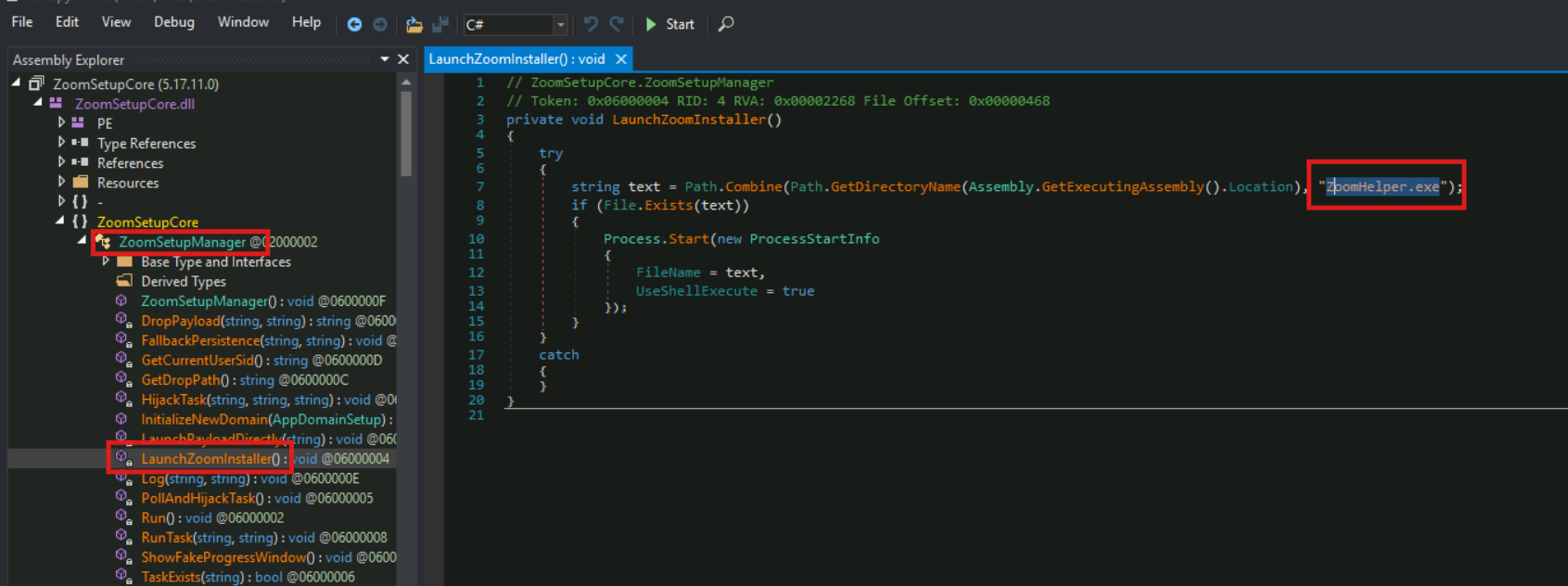
- Cargamos ZoomSetupCore en dnSpy y nos vamos a LaunchZoomInstaller para ver qué ejecutable legítimo se ha instalado junto al malicioso.
- The DLL hijacks a scheduled task created by the legitimate installer to maintain persistence. What is the full name of the hijacked scheduled task?
- Nos vamos a la carpeta Task dentro de System32 y vemos directamente la tarea.

- Nos vamos a la carpeta Task dentro de System32 y vemos directamente la tarea.
- The attacker successfully hijacked the scheduled task, which was enough to trigger the C2 beacon execution. However, the legitimate installer later modified the task again, forcing the attacker to make another modification. The final modification contained an error. What wrong executable is configured to run when the task fires?
- Miramos la Task.
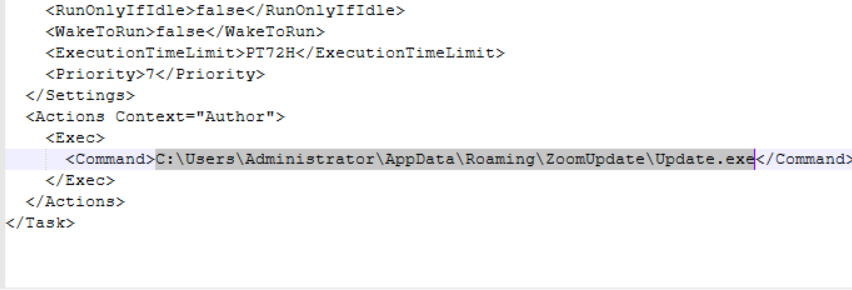
- Miramos la Task.
- The DLL itself contained the C2 beacon as an embedded payload and extracted it to disk at runtime. What is the resource name inside the DLL that contains the C2 beacon?
- Nos tenemos que ir a la sección Resources para ver la solución.
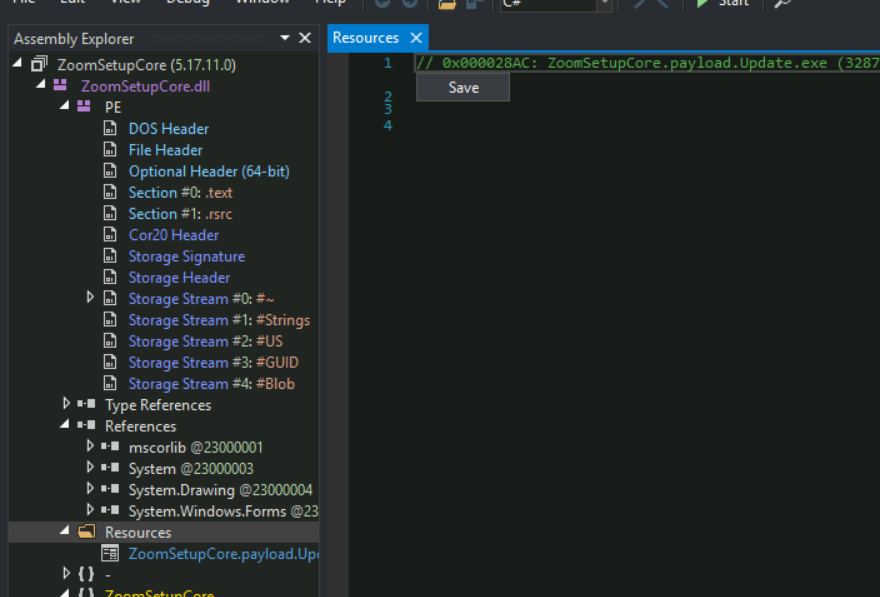
- Nos tenemos que ir a la sección Resources para ver la solución.
- After being dropped, when did the C2 beacon first execute on the system?
- No es la mejor manera pero tuve que hacerlo así porque me tuve que ir (Lo correcto sería parsearlo con PECmd y visualizarlo con TimelineExplorer ) . Filtramos por Update y vemos la primera ejecución.
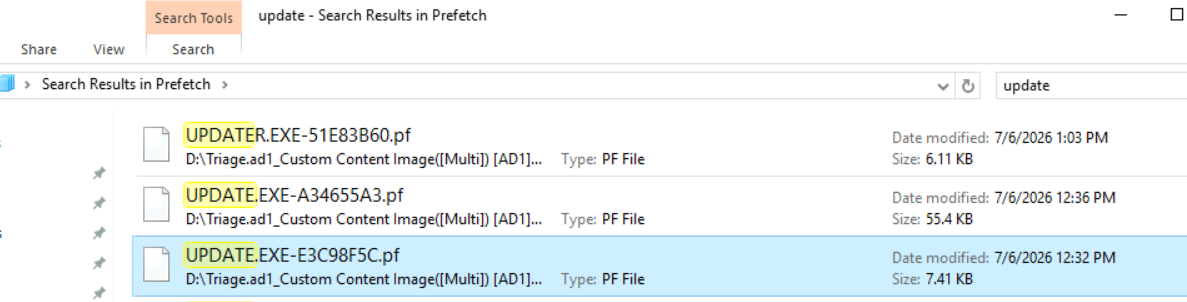
- No es la mejor manera pero tuve que hacerlo así porque me tuve que ir (Lo correcto sería parsearlo con PECmd y visualizarlo con TimelineExplorer ) . Filtramos por Update y vemos la primera ejecución.
Anti-Forensics and Destruction
- The attacker’s final objective appears to be destructive. Based on file-system timeline evidence, when was the destructive payload dropped to disk?
- Filtramos en MFT por la carpeta del atacante.

- Filtramos en MFT por la carpeta del atacante.
- Start decompiling the destructive payload. What command (a command with a typo) does the malware attempt to run to delete volume shadow copies?
- Dentro de DeleteVSS se puede el comando.
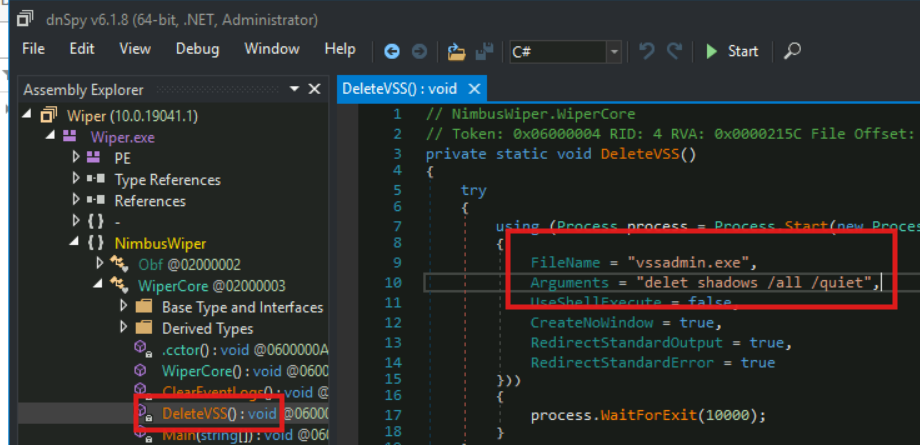
- Dentro de DeleteVSS se puede el comando.
- How many Windows event log channels does the wiper attempt to clear?
- Vemos que ha intentado borrar 6.
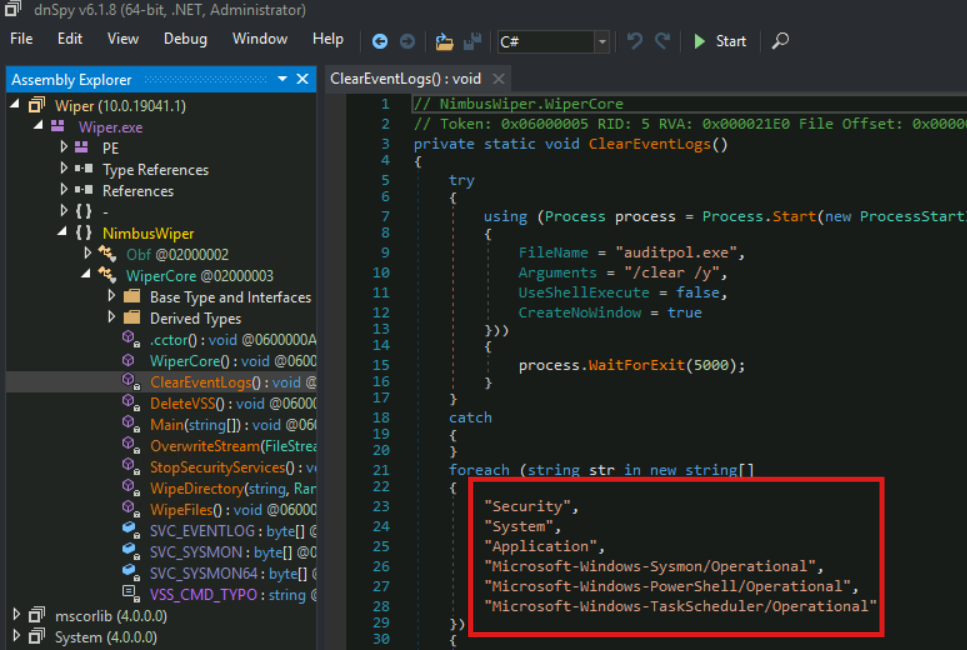
- Vemos que ha intentado borrar 6.
- Based on execution artifacts, when did the wiper begin clearing Windows event logs?
- Para hacerlo bien se debería usar PECmd pero bueno, estaba cansado de parsear datos.
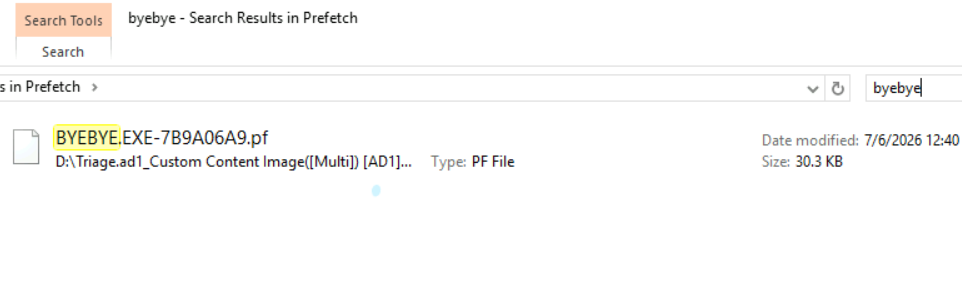
- Para hacerlo bien se debería usar PECmd pero bueno, estaba cansado de parsear datos.
This post is licensed under CC BY 4.0 by the author.